
Why separate security devices from the business network?
An office computer may need email, internet access, and business applications. A camera typically needs its recording platform, approved management connections, and services such as time synchronization. Those devices have different jobs and don't need unrestricted access to the same systems.
Network segmentation divides a larger network into smaller sections with controlled communication between them. It can limit unnecessary access, help identify security-system traffic, and reduce opportunities for a compromised device to reach unrelated business systems.
For facilities in Fresno, Clovis, and the Central Valley, this is a useful discussion when adding commercial security cameras, upgrading access control, or taking over a building with an undocumented network.
Does a separate network require separate switches and cabling?
Not necessarily. A virtual local area network, or VLAN, can separate traffic logically while devices share compatible physical switches and cabling. The network team then defines how those groups can communicate using routing controls, access control lists, and firewall policies.
A VLAN alone doesn't guarantee isolation. If traffic between VLANs is permitted without suitable restrictions, devices may still reach systems they don't need. CISA's network hardening guidance recommends segmentation as part of a broader defense-in-depth approach, including access controls and firewall capabilities.
Dedicated physical infrastructure may be appropriate where the facility's risk, operating requirements, or IT policies call for stronger separation. Compare both options against the equipment already installed and the communication the systems require.
| Approach | What to verify before choosing it |
|---|---|
| Shared infrastructure with logical separation | Switch capabilities, VLAN assignments, permitted traffic, uplink capacity, and who maintains the configuration. |
| Dedicated physical infrastructure | Separate equipment and cable routes, required links to other systems, management access, maintenance, and budget. |
What connections do cameras and recorders need?
Start with a communication map. Identify where footage is recorded, which users need live viewing or playback, and how the equipment is managed. A camera in a loading dock may need to send video to a network video recorder, or NVR, without reaching employee computers or payroll applications.
Cloud-managed and locally recorded systems can have different requirements. Use the selected manufacturer's documentation to identify necessary connections rather than applying a generic camera-network configuration.
Recording destination and recorder location
Authorized viewing and management devices
Required cloud services or approved remote access
Firmware updates, time synchronization, and other required services
Test recording, playback, authorized viewing, and management after the controls are applied. A configuration that blocks required traffic can interrupt the functions the facility depends on.
What changes when access control uses the network?
Identify the network-connected parts of the access control system first. Readers may connect to a door controller rather than directly to the IP network. The controller or management platform may need approved connections for credential updates, schedules, event reporting, or camera integrations.
An authorized manager might need to update permissions from a workstation. That doesn't mean every computer should be allowed to reach the controllers. Confirm the required administration paths and how the selected system operates if its network or cloud connection is interrupted.
Network planning and door safety require separate attention. Fire alarm interfaces, emergency release, and safe egress should be coordinated with the appropriate professionals and authorities. Review those dependencies during commercial access control planning.
Will segmentation stop cameras from slowing the network?
Segmentation can make traffic easier to identify and manage, but it doesn't automatically increase bandwidth. If cameras, office devices, and access points share an overloaded switch or uplink, putting them in different VLANs won't remove that physical bottleneck.
Measure traffic and review switch capacity, uplinks, recorder connections, and power requirements before blaming the cameras. A slow connection could also come from cabling faults or another configuration issue.
For a detached warehouse or remote yard, fiber optic cabling may provide the physical link to a remote switch. Network controls determine the permitted traffic across that link. Plan the link capacity and the access rules together.
What can you learn from the physical installation?
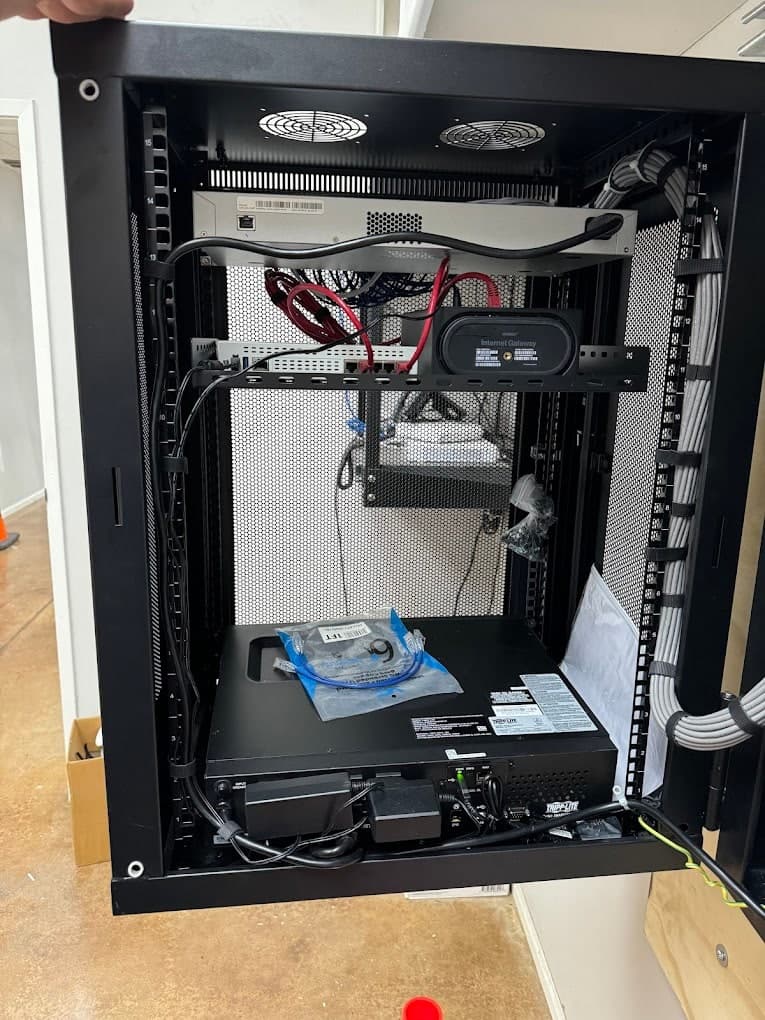
The Bezemer network cabinet pictured here shows rack equipment, network connections, cable management, and backup power. Those physical components are useful starting points when identifying the infrastructure that connected security systems depend on.
During an assessment, connect the physical inventory to the network documentation: which cable reaches each device, which switch port it uses, where recording or management equipment sits, and who controls configuration changes. Network policies need to be checked with the authorized IT contact.
Bezemer's structured cabling and commercial network design services can be discussed alongside cameras and access control. The written scope should identify the installation work and assign responsibility for security policies, configuration, and ongoing maintenance.
What should facilities, IT, and the installer agree on?
Coordinate the plan before equipment is installed or existing connections are changed. Facilities can define daily operating needs, the security installer can identify device requirements, and the authorized IT provider can define permitted network access.
Use this checklist to turn those conversations into a clear scope and handoff. Keep passwords, alarm codes, employee records, and sensitive network details in approved systems.
Inventory devices, recording platforms, controllers, switches, and required integrations.
Map permitted connections, including cloud services, remote viewing, updates, and administration.
Name the owner of IP addressing, VLANs, firewall rules, and configuration backups.
Review cabling, uplink capacity, PoE requirements, and remote equipment power.
Agree on an interruption window, acceptance checks, and a recovery plan if changes disrupt service.
Document the installation and name the contacts for support and future device additions.
Separation is one security measure. Secure accounts, firmware maintenance, controlled remote access, and ongoing review still matter. The facility should know who's responsible for each of them after installation.